
Controls & Keyboard Shortcuts
Sandustry is a keyboard-driven builder. These are the bindings that are legible in the official store screenshots and developer devlogs — with the source images shown, so you can check them yourself.
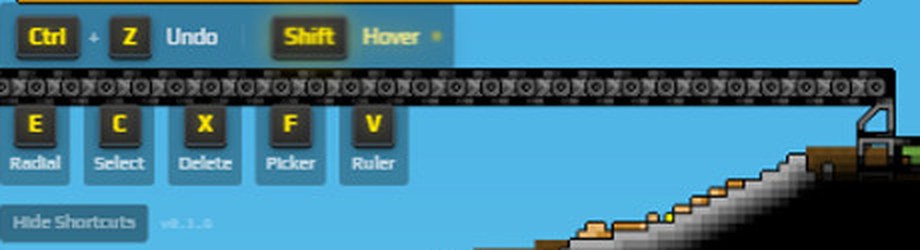
How this page is built. Sandustry has not published a keybind reference. Rather than copy a list we cannot verify, every row below is read off an official screenshot or a developer devlog, and the relevant crop is shown beneath the table. Bindings we cannot see in a source we can point at are not listed — that is a gap, not a claim that they do not exist.
Observed against build v0.1.6, the version stamped in the corner of the store screenshots. Recheck after Early Access.
The shortcut bar
Toggled with the Show Shortcuts / Hide Shortcuts button in the bottom-left corner of the screen.
| Key | Action | Notes |
|---|---|---|
| Ctrl+Z | Undo | Reverts the last build action. |
| Shift | Hover | Held modifier shown next to Undo in the shortcut bar. |
| E | Radial | Opens the radial menu. |
| C | Select | Selection tool. |
| X | Delete | Removes buildings and blocks. |
| F | Picker | Picks up the item under the cursor for placement. |
| V | Ruler | Measuring tool — useful for spacing presses and belt runs. |
Hotbar, grabber and movement
| Key | Action | Notes |
|---|---|---|
| 1–9,0 | Hotbar slots | The build hotbar runs 1 through 9 then 0, with an up/down arrow to page between rows. |
| Ctrl+Scroll | Resize the grabber | The grabber bar shows Min / − / 7x7 / + / Max, with Ctrl+Scroll as the binding and a "Shaking" toggle beside it. |
| Space | Jump and hover | Added in devlog 0.0.3: space enables jumping and mid-air hovering so you can build off the ground. |


Which of these actually matter
Two of them change how fast you build more than the rest combined.
The ruler (V) is the one most people never turn on. Sandustry's failure modes are almost all spacing problems — a slag press needs clearance below it, presses need gaps between them, and a belt needs a specific drop height to feed one. Measuring beats eyeballing, and it is the difference between a press pit that works and one you rebuild twice. See fixing a jamming slag press.
Ctrl+Scroll on the grabber matters because the grabber is how you fix everything that goes wrong: pulling steam out of a blocked pipe, clearing material that piled on a machine, moving lava that will not go through a pipe. A grabber sized for the job is faster than rebuilding around the problem.
What is missing from this page
Movement keys beyond space, menu and camera bindings, and any rebinding UI. None of those are legible in a source we can verify, so they are absent rather than guessed. If Early Access ships an in-game keybind screen, that becomes the source and this page gets rebuilt from it.
Screenshots are official Sandustry store artwork by Lantto Games / Hooded Horse, used to illustrate this unofficial fan site.
Sources for this page
- Sandustry on SteamDeveloper / official
- Sandustry devlog 0.0.3 — Fluxite (Lantto, itch.io)Developer / official